.png)


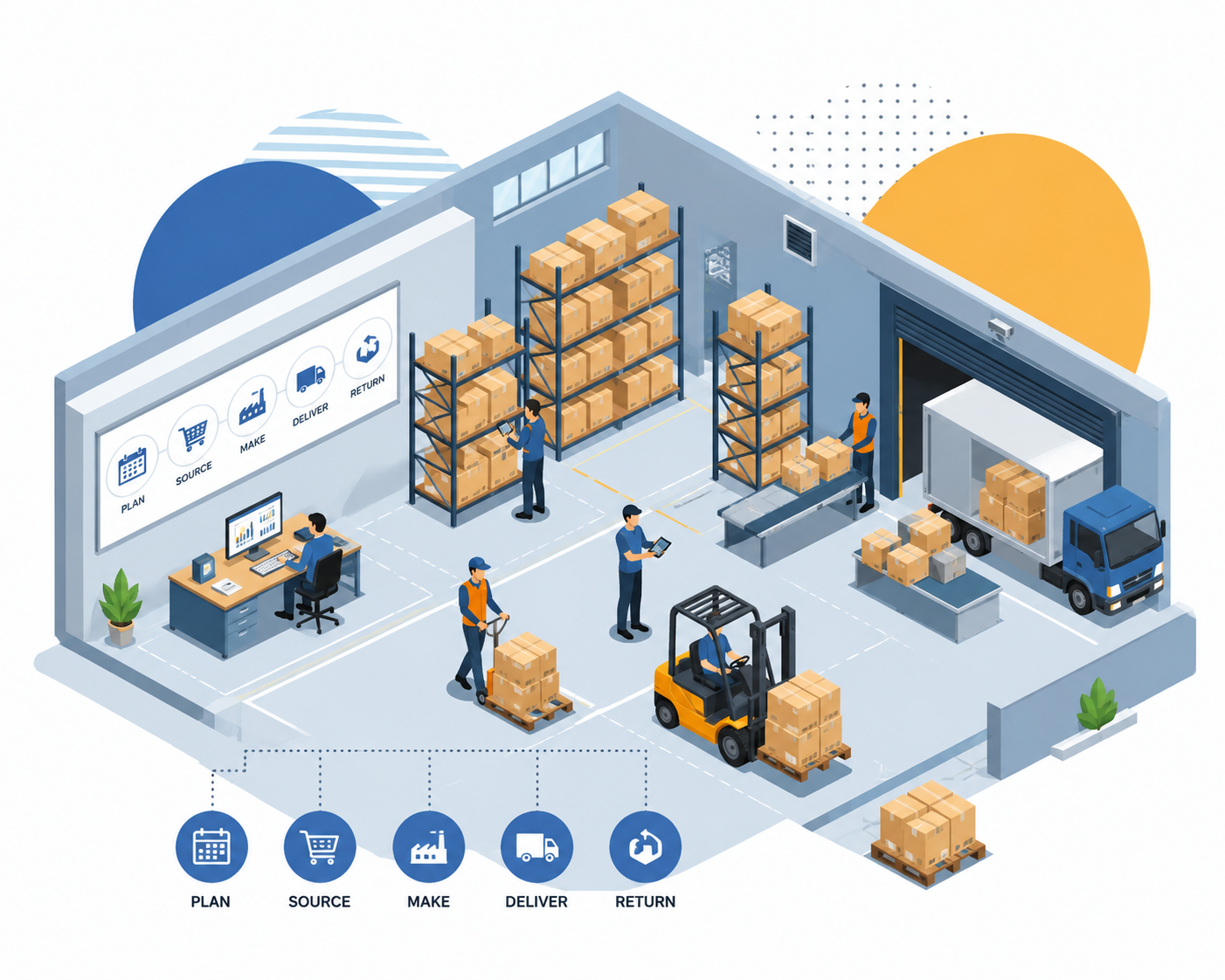
What is Supply Chain Management?
Supply Chain Management (SCM) is the process of managing and monitoring the complete journey of products or services, starting from raw material procurement to delivering the final product to customers.
It helps businesses control operations efficiently, improve productivity, and ensure better customer satisfaction.
SCM provides complete visibility across the business process by tracking goods, services, and information throughout every stage.
It helps organizations optimize resources, maintain inventory, forecast customer demand, and improve operational efficiency.
An effective supply chain system not only improves business performance but also supports better decision-making, cost control, vendor management, and sustainable business operations.
Stages of Supply Chain Management
Planning
Develop strategic planning based on business requirements, customer demand forecasting, and resource management to ensure smooth operations.
Sourcing
Manage suppliers and vendors efficiently by handling procurement processes, purchasing activities, and raw material availability.
Production
Monitor and manage manufacturing activities to ensure products are created according to quality standards and business requirements.
Distribution & Delivery
Handle product movement and delivery processes effectively to ensure timely distribution to customers.
Returns Management
Manage returned products, damaged items, and replacement processes while maintaining customer satisfaction.
Benefits of Supply Chain Management
1) Improves product quality and process control
2) Enhances business productivity and operational efficiency
3) Better cash flow management
4) Strengthens supplier and vendor relationships
5) Reduces operational and inventory costs
6) Improves supply chain visibility
7) Cloud-based accessibility and data management
8) Reduces product waste and unnecessary expenses
9) Supports demand forecasting and planning
10) Helps improve customer satisfaction
What is CRM Software?
Customer Relationship Management (CRM) Software is a system designed to manage and monitor the complete customer journey, starting from lead generation and inquiry management to sales conversion and customer support.
It helps businesses manage customer interactions efficiently, improve sales productivity, and ensure better customer satisfaction.
CRM provides complete visibility across the sales and customer management process by tracking leads, inquiries, follow-ups, quotations, orders, and customer communications throughout every stage.
It helps organizations optimize sales activities, maintain customer records, forecast sales opportunities, and improve operational efficiency.
An effective CRM system not only improves business growth but also supports better decision-making, sales performance tracking, customer retention, and long-term relationship management.
Stages of CRM Software
Lead Management
Capture and manage leads from various sources such as websites, social media, marketing campaigns, referrals, and direct inquiries to ensure effective sales opportunities.
Inquiry Management
Manage customer inquiries efficiently by recording customer requirements, assigning inquiries to sales representatives, and tracking inquiry status throughout the sales cycle.
Follow-Up Management
Schedule and monitor calls, meetings, emails, and reminders to maintain regular communication with prospects and improve conversion rates.
Quotation & Sales Management
Create and manage quotations, pricing structures, sales proposals, and order confirmations while tracking the complete sales process.
Customer Relationship Management
Maintain customer records, communication history, support requests, and after-sales interactions to build strong and long-term customer relationships.
Benefits of CRM Software
1) Improves customer relationship management
2) Enhances sales productivity and operational efficiency
3) Better lead and opportunity management
4) Strengthens customer engagement and retention
5) Improves follow-up and sales tracking processes
6) Provides complete visibility of the sales pipeline
7) Cloud-based accessibility and centralized customer data management
8) Reduces manual work and administrative efforts
9) Supports sales forecasting and business planning
10) Helps improve customer satisfaction and business growth
What is Role Based Access Control (RBAC)?
Role Based Access Control (RBAC) is a security system that manages user permissions and access rights based on their roles and responsibilities within an organization.
It helps businesses protect sensitive information by ensuring that users can only access the modules, data, and functionalities required for their specific job roles.
RBAC provides complete control over system access by defining user roles, permissions, and authority levels across departments.
It helps organizations improve security, maintain compliance, reduce operational risks, and ensure accountability for user activities.
An effective RBAC system not only strengthens data security but also supports efficient user management and operational transparency.
Stages of Role Based Access Control (RBAC)
Role Creation
Create predefined roles such as Administrator, Manager, HR Executive, Sales Executive, Production Manager, and Employee based on organizational requirements.
Permission Assignment
Assign module-wise permissions including view, add, edit, delete, approve, export, and reporting rights according to job responsibilities.
User Mapping
Associate users with appropriate roles and departments to ensure controlled system access.
Access Monitoring
Monitor user activities, login history, and access logs to maintain security and accountability.
Audit & Compliance
Maintain records of user actions and permission changes for internal audits and regulatory compliance.
Benefits of Role Based Access Control (RBAC)
1) Improves data security and confidentiality
2) Prevents unauthorized system access
3) Simplifies user permission management
4) Enhances operational transparency
5) Supports compliance and audit requirements
6) Reduces business security risks
7) Provides department-wise access control
8) Improves accountability and responsibility tracking
9) Enables scalable user administration
10) Strengthens overall organizational security
What is Multi User Management?
Multi User Management is a system that allows multiple users to access and work within the same platform simultaneously while maintaining controlled permissions and responsibilities.
It helps organizations manage employees, departments, teams, and business operations efficiently from a centralized environment.
Multi User Management provides seamless collaboration between departments while ensuring data security and operational control.
It helps businesses assign tasks, monitor user activities, track performance, and improve workflow efficiency.
An effective Multi User Management system enhances teamwork, accountability, productivity, and overall business performance.
Stages of Multi User Management
User Creation
Create and manage user accounts for employees, managers, administrators, and department heads.
Role Assignment
Assign specific roles and permissions to users according to their responsibilities and business requirements.
Department Management
Organize users into departments and teams for efficient operational management.
Activity Monitoring
Track user activities, task completion status, and system interactions to improve accountability.
Performance Analysis
Generate reports and insights to evaluate user productivity and operational efficiency.
Benefits of Multi User Management
1) Supports multiple users simultaneously
2) Improves collaboration and teamwork
3) Centralized user administration
4) Better operational transparency
5) Department-wise management and control
6) Enhanced employee accountability
7) Improved productivity and efficiency
8) Real-time activity tracking and monitoring
9) Scalable organizational management
10) Secure access and permission control
What is Production Management?
Production Management is the process of planning, organizing, monitoring, and controlling manufacturing activities to ensure efficient production operations.
It helps businesses optimize resources, reduce manufacturing costs, and maintain product quality standards.
Production Management provides complete visibility into production schedules, work orders, resource allocation, and manufacturing performance.
It helps organizations improve productivity, reduce wastage, and ensure timely product delivery.
An effective production management system supports operational excellence, quality control, and sustainable business growth.
Stages of Production Management
Production Planning
Create production schedules based on customer demand, available resources, and manufacturing capacity.
Material Management
Manage raw materials and inventory required for smooth production processes.
Work Order Management
Generate and monitor production work orders while tracking progress at every stage.
Quality Control
Ensure products meet quality standards through inspections and quality assurance procedures.
Production Monitoring
Track machine utilization, production output, and manufacturing performance in real time.
Benefits of Production Management
1) Improves production efficiency
2) Optimizes resource utilization
3) Reduces manufacturing costs
4) Enhances product quality control
5) Improves production planning accuracy
6) Reduces production delays
7) Minimizes material wastage
8) Provides real-time production visibility
9) Increases operational productivity
10) Supports timely order fulfillment
What is HRMS & Payroll Management?
Human Resource Management System (HRMS) & Payroll Management is a comprehensive solution designed to manage employee information, attendance, leave, payroll processing, and workforce operations from a centralized platform.
It helps businesses automate HR activities, reduce manual work, and improve employee management efficiency.
HRMS provides complete visibility into employee records, attendance tracking, leave management, salary processing, and organizational performance.
It helps organizations streamline workforce operations, ensure compliance, manage employee benefits, and improve overall productivity.
An effective HRMS & Payroll system not only improves employee satisfaction but also supports better workforce planning, payroll accuracy, and business growth.
Stages of HRMS & Payroll Management
Employee Management
Manage employee profiles, personal information, documents, job roles, departments, and employment history from a centralized database.
Attendance Management
Track employee attendance, shifts, working hours, late arrivals, overtime, and biometric attendance records accurately.
Leave Management
Manage leave requests, approvals, leave balances, holidays, and employee leave policies efficiently.
Payroll Processing
Calculate salaries, allowances, deductions, incentives, taxes, PF, ESI, and generate salary slips automatically.
Performance Management
Monitor employee performance, appraisals, targets, and productivity to support employee growth and organizational development.
Benefits of HRMS & Payroll Management
1) Centralized employee data management
2) Automated attendance and leave tracking
3) Accurate payroll processing and salary calculation
4) Improved workforce productivity and efficiency
5) Better compliance with labor regulations
6) Reduces manual HR administration work
7) Real-time employee reporting and analytics
8) Improves employee satisfaction and engagement
9) Streamlines recruitment and workforce planning
10) Supports organizational growth and development
What is Sales Person Tracking?
Sales Person Tracking is a system designed to monitor and manage the activities, locations, customer visits, and performance of sales representatives in real time.
It helps businesses improve field sales operations, increase sales productivity, and ensure accountability among sales teams.
Sales Person Tracking provides complete visibility into sales activities, customer visits, follow-ups, route planning, and target achievements.
It helps organizations optimize field operations, improve customer engagement, and monitor sales performance effectively.
An effective Sales Person Tracking system not only enhances sales efficiency but also supports better decision-making, reporting, and revenue growth.
Stages of Sales Person Tracking
Task Assignment
Assign leads, customer visits, follow-up activities, and daily sales tasks to sales representatives based on business requirements.
Location Tracking
Monitor real-time GPS locations, travel routes, check-ins, and field movements of sales personnel.
Visit Management
Record customer visits, meeting outcomes, follow-up schedules, and customer feedback for effective relationship management.
Performance Monitoring
Track sales targets, achievements, conversion rates, productivity, and overall sales team performance.
Reporting & Analytics
Generate detailed reports on sales activities, customer visits, lead status, and performance metrics for management review.
Benefits of Sales Person Tracking
1) Real-time tracking of field sales activities
2) Improves sales team productivity and efficiency
3) Better customer visit management
4) Enhances accountability and transparency
5) Improves lead follow-up and conversion rates
6) Provides GPS-based location monitoring
7) Supports effective route and territory management
8) Real-time sales reporting and analytics
9) Improves customer engagement and service quality
10) Helps increase sales performance and revenue growth

Free training & 24/7 Support

Serious about security & privacy

Streamlined Business Automation